
Today we dive into the world of compulsive clickers—the folks who just can’t help but tap on every tantalizing link that winks at them from their inbox. It’s not just a harmless habit; these clicks can lead to some pretty sketchy places. Imagine a world where every click could be a potential minefield, threatening your digital safety with every tap. But here’s the kicker: can we change these click-happy habits? Let’s explore whether it’s possible to turn a reckless clicker into a prudent, pause-and-think-before-you-click kind of user.
In this episode:
Can Clickers Change? – Ep 461
Today’s Episode is brought to you by:
Kardon
and
HIPAA for MSPs with Security First IT
Subscribe on Apple Podcast. Share us on Social Media. Rate us wherever you find the opportunity.
Great idea! Share Help Me With HIPAA with one person this week!
Learn about offerings from the Kardon Club
and HIPAA for MSPs!
Thanks to our donors. We appreciate your support!
If you would like to donate to the cause you can do that at HelpMeWithHIPAA.com
Like us and leave a review on our Facebook page: www.Facebook.com/HelpMeWithHIPAA
If you see a couple of numbers on the left side you can click that and go directly to that part of the audio. Get the best of both worlds from the show notes to the audio and back!
Thanks to our donors.
HIPAA Briefs
[02:59]How HHS OCR Is Boosting HIPAA Enforcement; Here Come Audits
Audits are happening, reminders on the SRA initiative, security rule changes and more.
Sidebar:
Donna is doing a 2-part webinar on Harnessing the Power of AI.
- Session 1: June 6, 2024 – FREE 45 minute session on Jun 6 discussing the basics of AI and providing insights on strategizing your organization’s AI integration.
- Session 2: June 26, 2024 – $97 for a 2 hour session on a more comprehensive experience with actionable steps to protect your business. (The first 20 people to sign up pay only $67.)
- If the email or text creates an emotional response, stop.
- Don’t email personal or financial info, but not only that, don’t put that info in a form or anything.
- Don’t click on email links, but also don’t click on QR codes either.
405(d) Tip of the Week
[11:00]Freely available series of 2-3 minute videos that explain some key cybersecurity terms “in a fun and engaging manner”. The first one that just came out is Botnet.
Before we go further two quick notes
[12:12]Ascension Cyberattack
This thing is huge because Ascension is huge. They are one of the largest health systems in the US with 140 hospitals in 19 states and DC. That doesn’t count all the clinics they have purchased around those hospitals either.
How the Ascension cyberattack is disrupting care at hospitals
The nurse’s union is raising the flag about patient safety concerns. Just more evidence how important (and spot on) our messaging is: Cyber Safety is Patient Safety
Metro Detroit nurses union worries about patient safety amid Ascension hospital cyberattack fallout
“For the last two weeks, doctors and nurses at Ascension hospitals in more than a dozen states haven’t had access to patient electronic medical records because of a massive ransomware attack.“
“….the hospital hasn’t scaled back its services. She says there was one day last week when 38 surgeries were done.”
“Not every one of these patients had their lab work returned before they went into the O.R. This is a serious concern,”
AI PSA:
All AI features are not a good idea for all situations. This one just makes it more obvious that we must have an AI strategy in place yesterday. It is one of the most important tasks you can get done immediately. We have enough problems without losing track of data like this one: New Windows AI feature takes screenshots of your desktop ‘every few seconds’ and I can’t imagine wanting that | PC Gamer
Can Clickers Change?
[15:44]Fortra’s Terranova Unveils Global Phishing Benchmark Report in Feb but we haven’t had time to get back to it. They do the annual Gone Phishing TournamentTM as part of CSAM every year. I have phished our team for one year using it which was great fun.
Sidebar:
Speaking of CSAM, they are already releasing info about it so get started now to take advantage of more free cybersecurity awareness training resources. The theme of Cybersecurity Awareness Month is using the CISA campaign called Secure Our World. As they point out, the theme is supposed to “remind us that there are simple ways to protect yourself, your family and your business from online threats”. Resources are already available to use now if you want to get started. You can also sign up as Champion and get access to resources as they are announced. Cybersecurity Awareness Month Secure Our World: Simple Steps to Protect Your Family is an example. “We use MFA at work and it’s great” said no one in the real world ever. But, they can dream.
Now, back to the phishing tournament.
In the opening of the report they discuss all those scary things happening with Generative AI even sharing that 85% of security pros think the rise in cyber incidents is the bad guys using it. Remember, the Verizon DBIR report just said they aren’t seeing data to support that but…. This quote brings out the same point from Verizon, though. It’s the people, people.
In the face of all these concerning developments, the inciting incident for many data breaches remains the same: human error. Even with better technological safeguards at the average organization’s disposal, hackers are enriching themselves more than ever before. The reason is simple—phishing links don’t click themselves. Human beings, however well-intentioned, do.In addition to the DBIR confirming that data breaches are tracking back to human error, this report shows us where many of those human errors get started with a simple message and where they go wrong. They take actual phishing emails out in the wild and adapt them for the phishing campaign. This year it used one with a fake password expiration message that was harvesting credentials. It was sent to almost 300 organizations accounting for over 1.37 million end users being attacked over the course of several weeks in October. It also included 141 other countries, not just the US. In all there were 13 different sectors included. This has really started to have a lot of data to work with.
Here is the big point that has been made every year – if they click the first time they are even more likely to give up the goods. Literally putting the stats behind the point that one click is all it takes. The great news is 89.6% did not click at all. But of the 10.4% who did click 6.5% entered their credentials.
That means you have roughly a 10% chance of getting any one of your users to click. But once they click they are over 62% likely to follow through. You have to stop them before they click at all because once they do your odds do not look good AT ALL!
How do we teach people not to click in the first place is still a very tough question to answer. The things we have used so far made a huge difference but the ones that are determined to click are also determined to share the goods. Maybe they don’t see themselves as determined to do it maliciously but the fact that nothing anyone is doing so far can stop them once they start down the path.
Mixed Bag On Sector Stats
[28:38] When they break down the total clicker percentages by industry it isn’t promising that Education has the highest rate. If they can’t figure out how to teach people not to click, how are the rest of us supposed to do it!?! They had a 16.7% rate. Great news is Healthcare was at a solid 10% slightly below the average number of clickers. Unfortunately, the sector next higher from them at 10.1% is IT.Of the 13 sectors, 11 of them included at least one organization that had a click rate higher than 25%. While many sectors had organizations with a 0% click rate that did not happen in Healthcare either. 2.8% was the lowest. Education had a low of 1.2%! The only sector with a higher minimum percentage was Energy at 2.9%! Yes, another Critical Infrastructure Sector. At least IT did have some with a 0% click rate.
The max is not good news for any of those sectors either: Healthcare (26.8), IT (33.3) and Energy (36.2). BTW, Education had a max of 37.5.
When you push that out further to see who gave up the goods by industry Healthcare remained solidly in the average there too at 66.6%. Sadly, again the next one above them at 67.2% is IT, though.
It is really starting to show a difference in sectors who have people doing a ton of email as part of their daily work more likely to have clickers. Also, just because your sector has cybersecurity regulatory obligations you are not doing substantially better than those who have little, if any. Maybe the first statement does have an impact on the second one though.
Size mattered somewhat but did it really?
[36:40] Size of organizations were considered too. There was a mixed bag of results there also. Note they based it on the number submitted for the campaign not the number that may be employed at the organization. It could be that they included only the worst clickers.The under 100 employees group was the most likely to click the link at 12.9%. BUT, they were also the least likely to give up the goods at 50%. Still a flip of the coin if they give it up or not but at least it is substantially better than the rest of the groups which are all over 60%. Unfortunately, the highest one of those groups was 100-499 employees showing over a 66% chance they will share the info.
To summarize what we know from this report.
Good news is:
Overall we have about 90% who will not fall for a phish.
Healthcare is not the worst nor the best, but solidly in the middle, overall.
SMBs under 100 employees have a better rate of giving up the goods after they click at only 50%.
Not so good news:
Once they click we know they will likely keep going once they start down the path.
Healthcare is still firmly in the middle of the pack here.
SMBs up to 500 are more likely to click the link and share the info at 66.1%.
I like the way they summarized things in this point:
These results prove there is no one-size-fits-all solution for security awareness. The existing culture, as well as leadership’s willingness to make cyber security awareness a top priority versus a low-stakes compliance consideration, can often dictate how engaging and effective awareness programs end up being at the corporate level.
The point is we have to keep trying different things to get the message across that we must not trust anything in an email. The threats that keep coming at us through messaging are not getting better any time soon. They are finding new ways to get you to click a link or open an attachment. We have to have a behavior change and that is not an easy thing to accomplish.
We are back to where we started with the need to use all the tools available to us on a consistent basis to keep the need front of mind to resist the click in the first place. But, if you do click check again before entering credentials or allowing a routine to run. Here are their recommendations for all of us to keep “front of mind.”
[43:56]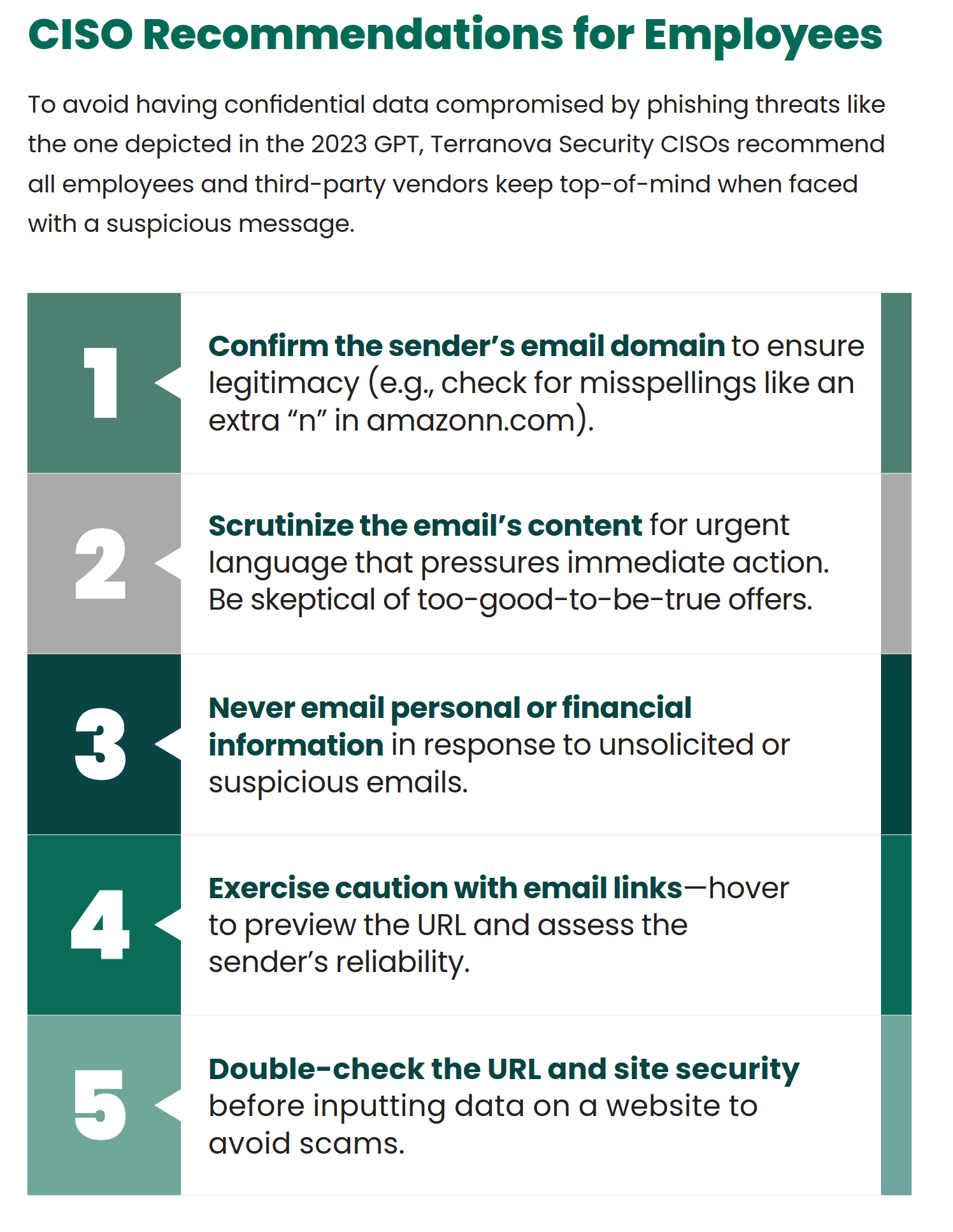
Our additional 2 cents on those 5 recommendations:
So, what have we learned from our dive into the world of unstoppable clickers? While their quick-click habits might lead them down some risky paths, it’s not all doom and gloom. With the right guidance and a bit of digital savvy, even the most click-happy individuals can learn to take a beat before diving in. It’s about nurturing that moment of hesitation, turning a potential click disaster into a thoughtful decision. So, whether you’re a serial clicker or just someone who loves a good email adventure, remember: a little pause goes a long way in keeping your digital life safe and sound.
Remember to follow us and share us on your favorite social media site. Rate us on your podcasting apps, we need your help to keep spreading the word. As always, send in your questions and ideas!
HIPAA is not about compliance,
it’s about patient care.TM
Special thanks to our sponsors Security First IT and Kardon.


