
Ever wonder what would happen if a hacker walked right into your digital living room, kicked off their shoes, and hung out for three months without anyone noticing? This week’s episode dives into a jaw-dropping CISA Red Team Assessment that reads like a cybersecurity horror flick—complete with ignored alarms, forgotten passwords, and an open-door policy for digital intruders. It’s not just about tech failures; it’s a full-blown case study in what happens when leadership decides “meh” is a strategy.
In this episode:
EDR Failed – Leadership Did Too – Ep 511
Today’s Episode is brought to you by:
Kardon
and
HIPAA for MSPs with Security First IT
Subscribe on Apple Podcast. Share us on Social Media. Rate us wherever you find the opportunity.
Great idea! Share Help Me With HIPAA with one person this week!
Learn about offerings from the Kardon Club
and HIPAA for MSPs!
Thanks to our donors. We appreciate your support!
If you would like to donate to the cause you can do that at HelpMeWithHIPAA.com
Like us and leave a review on our Facebook page: www.Facebook.com/HelpMeWithHIPAA
When you see a couple of numbers on the left side of the text below click that and go directly to that part of the audio. Get the best of both worlds from the show notes to the audio and back!
HIPAA Briefs
[02:38]Resolution Agreement with Vision Upright MRI | HHS.gov
The email from OCR has the subtitle “Small Health Care Providers Also Must Comply with the HIPAA Rules”. That is their point right off the bat.
Vision Upright MRI LLC (VUM) in San Jose, CA is a one location MRI center. Not surprisingly the issue that got them here involves their PACS server. That is the picture and archiving communications system used in imaging systems to store and view the images.
OCR notified VUM on Dec 1, 2020 that they had gotten information that the PACS server was accessible via the internet and PHI was disclosed as the result. It doesn’t explain how they found out but that is usually because an employee (or ex-employee), patient, vendor or random internet researcher found out about the server and filed the complaint. The investigation started then – NOT the way you want to launch your investigation.
They finally did a breach notification about it in March of 2025 stating it impacted 21,778 patients. Class actions were already lining up before the resolution agreement officially came out. It was signed Feb 12.
The delays here say alot about their program and means they will likely get a lot of attention from class actions!
Obviously, they have them for not doing an SRA nor a breach notification within 60 days since they never got around to it even after OCR notified them of the investigation. So many questions!
They are paying $25,000 and entering a 2 year CAP.
“Cybersecurity threats affect large and small covered health care providers,” said OCR Acting Director Anthony Archeval. “Small providers also must conduct accurate and thorough risk analyses to identify potential risks and vulnerabilities to Protected Health Information and secure them.”
PSA EOL Windows 10
[12:22]Extended Security Updates (ESU) program for Windows 10 | Microsoft Learn
Just in case someone reads a headline and thinks MS is extending Windows 10 EOL for everyone – WRONG.
EDR Failed – Leadership Did Too
[16:16] What happens when you invite the hackers in? Well, turns out—they get comfy. CISA’s Red Team was given permission to test a critical infrastructure organization’s cybersecurity… and the results are enough to give anyone in cybersecurity a headache. For obvious reasons, we aren’t told who the entity was nor what sector they were in but we are in the same boat no matter who they are. Let’s look at what happened and what they found. BTW, you could ask for your own test from CISA. But, before you do, you should take a minute and review what the report says with us.Here are the basics we know:
- CISA conducted a three-month red team assessment on an unnamed U.S. critical infrastructure organization.
- The red team simulated real-world cyber attacks to test detection and response capabilities.
- The organization cooperated with CISA to release this public report—so while we don’t know the name or sector, healthcare fits the profile.
- The attack team had no knowledge of the technology assets in the organization and had to start with doing research of the target just like a criminal attacker would do.
The Intrusion Begins
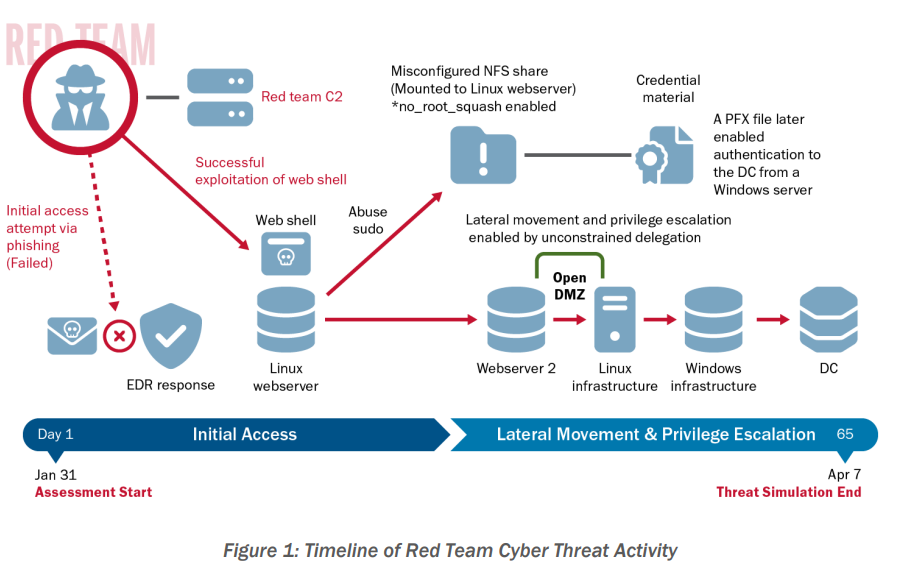
First, they tried spearphishing campaigns. They targeted 13 employees most likely to be ones that communicated with external partners. They did get one user to respond twice and run the malicious payload but thankfully the EDR software detected it and stopped it. So, that didn’t work.
Great! The user clicked but the security software protected them TWICE!
Next, they did external recon of the network addresses. Turns out the door into the network wasn’t just open—it was left open by a previous guest. CISA’s red team didn’t even have to pick the lock, they just used the key left under the mat by another vendor’s VDP. And the org didn’t notice it… because they assumed the last test wrapped things up. Oops. Apparently, someone was testing vulns and left a hole open. Similar to us saying that testing a problem and opening up the firewall but forgetting to close it when you are done!
Not so great – they found an opening that was apparently left by another testing vendor and never closed the door behind them.
CISA notified the trusted agent within the organization about the opening when they found it. They reported it because it was really bad and they felt it would have been too risky that criminals would find it while they were doing the test. That meant that the TA had to initiate threat hunting activity to deal with it. While doing that investigation they did detect some of the Red Team activity. If they hadn’t felt the need to notify them – who knows when they would have caught them. Even with this they didn’t catch them right away.
What they found was so bad – they had to tell their inside confidant about it which forced them to start threat hunting without actually catching anything the Red Team had done yet.
Even more concerning is they had found that web shell before but not done anything to remediate it – nothing. They just assumed it was leftover from the test vendor and didn’t investigate further.
Someone had seen the problem before so they knew it was there! NO ONE FIXED IT!
But Wait! There’s More.
[26:22] The Red Team was able to continue their work, though. Turns out the login they were able to use to get in the web shell called WEBUSER1, a default user name, also had excessive admin rights in the Linux environment. It lets them run commands without even having to enter a password!Now, they were able to get in and get authority to start moving around by using a default user name that didn’t even require a password! Things are going downhill quickly and they are being hunted at the same time but still moving around the network!
At this point they were able to use some basic system security tools that wouldn’t raise any alarms. They were able to escalate privileges to search for private certificate files. The first pass they found 61 private SSH keys and even worse, a file in cleartext that included domain access credentials. They were able to use that to authenticate themselves and be operating within the domain.
A plain text file that included domain level login credentials. That was helpful!
The Linux environment was configured not to access the internet directly – great! But, there was an open internal proxy server that let them send their internet traffic through it with no problem.
So, great news that they blocked Linux servers from accessing the internet. Not so great news that they had a wide open server that would manage any internal traffic that needed to get to the internet.
At this point, they had everything they needed to have unrestricted access and ability to move to all the Linux hosts. That included 2 highly privileged accounts with root access to hundreds of servers.
Within one week of initial access they had established persistent access on 4 Linux servers.
The doors were now open to them any time they wanted to access them. Each one was configured differently so if the defenders found one they wouldn’t see another that looked like it. They even had scripts that would run at boot time so they wouldn’t even be kicked out with a reboot.
Then they found a server and had root access to it that was running a program called Ansible Tower which is a Linux tool that does automation and has all kinds of access. They could hit 6 other servers from that one server. If this was a real attack all of the work that server automates would have to be shut down until the attack was mitigated.
Again, they found something so bad they had to tell the trusted insider about it. This made it even easier for the defenders to start seeing abnormal activity from the Red Team – but not stop them.
Within 2 weeks of gaining access they were able to get to the Windows domain controllers which let them move through all of the Windows based systems. They even exfiltrated the Active Directory information. Let’s just say they found a lot of really bad things when they got into Windows. It is a long list of issues.
They were able to go pretty much anywhere they wanted after that and they did go all over the place. Read the details in the document to learn more about how much they were able to get into.
They ran ransomware simulators which should have set off all kinds of alerts. 2 out of 9 users that were targeted with that simulation reported the event to defensive staff who identified all the hosts where it ran. But the rest of the users:
Five users likely rebooted their systems when observing the ransomware, one logged off and on, one closed the ransomware application repeatedly and continued working, one locked their screen, and another user exited the ransomware process after two hours.
Defenses Were Inadequate – At Best
[37:51] There are details in a section on the defense activity. The net of it is the detection tools failed and even when they alerted they were never read. Other tools were even disabled.Here is a quote from the report about the EDR solution:
The organization’s EDR solutions largely failed to protect the organization. EDR detected only a few of the red team’s payloads in the organization’s Windows and Linux environments. In the instance the EDR protected the organization from the initial phishing payload, it generated an alert that network defenders neither read nor responded to. The red team excelled in bypassing EDR solutions by avoiding the use of basic “known-bad” detections the tools would capture. The team also inflated its file sizes above the upload threshold of the organization’s EDR. In addition, the organization completely lacked any EDR solution in a legacy environment. As such, the red team’s persistence there went undetected throughout the assessment.
There is a long list of suggested mitigation measures in the report which are definitely worth your time to review. They did include 4 positive things in the defensives but the overwhelming list of problems paled in comparison.
The Executive Summary explains how it went and includes three specific “Lessons Learned” but there are details further down in the report. Here they are:
[43:59]Lesson Learned: Insufficient Technical Controls
1. Perimeter Not Adequately Segmented: The perimeter was not firewalled from its internal network
2. Overreliance on Host-Based Tools: They counted on ones that didn’t detect the network layer activity
3. Lack of Monitoring on Legacy Systems: They were in there for months with no detection.
Lesson Learned: Continuous Training, Support, and Resources
4. Insecure System Configurations: Multiple systems configured insecurely.
5. Alerts Were Ignored or Not Reviewed: Security alerts triggered by the Red Team were never reviewed.
6. Poor Identity Management: No centralized control over Linux identities, manual log reviews which missed things, no detect of AD abuses.
Lesson Learned: Business Risk
7. Leadership Deprioritized Known Vulnerabilities: Insecure and outdated software was brought to leadership as a security concern and leadership decided to accept the risk and deprioritized addressing it. The security team attempted compensating controls but they weren’t enough to block the hole that the Red Team used to get into the network.
So, what did we learn today? That no matter how many shiny tools you’ve got, if no one’s reading the alerts or locking digital doors, you might as well hand over the keys. This CISA Red Team operation wasn’t just a test—it was a full-blown cybersecurity trust fall, and leadership missed the catch. If you’re not training your people, securing your systems, or taking vulnerabilities seriously, someone else will… probably with root access. In cybersecurity, ignorance isn’t bliss—it’s an open invitation, and the intruders might even stay long enough to start redecorating.
Remember to follow us and share us on your favorite social media site. Rate us on your podcasting apps, we need your help to keep spreading the word. As always, send in your questions and ideas!
HIPAA is not about compliance,
it’s about patient care.TM
Special thanks to our sponsors Security First IT and Kardon.


