

We talk about patching pretty frequently on the podcast, but there is still a misconception that your IT or MSP vendor is patching everything. Systems are not designed to patch all hardware and software all of the time. There is a level of responsibility that falls on us to understand what is being patched by IT, what isn’t and what we do about those unpatched applications.
In this episode:
Get Your Patch On – Ep 302
Today’s Episode is brought to you by:
Kardon
and
HIPAA for MSPs with Security First IT
Subscribe on Apple Podcast. Share us on Social Media. Rate us wherever you find the opportunity.
The HIPAA Boot Camp
Virtual Edition Aug 17-19, 2021
Great idea! Share Help Me With HIPAA with one person this week!
Thanks to our donors. We appreciate your support!
If you would like to donate to the cause you can do that at HelpMeWithHIPAA.com
Like us and leave a review on our Facebook page: www.Facebook.com/HelpMeWithHIPAA
If you see a couple of numbers on the left side you can click that and go directly to that part of the audio. Get the best of both worlds from the show notes to the audio and back!
Get Your Patch On
[06:12] If you listened to episode 300 when we talked with Dave Bittner and Ben Yellen from the CyberWire Caveat podcast, we asked them if cyber attacks are as bad as we think they are or are we just being paranoid. Their response was, no, it’s worse than you think it is.Just within the last week or so NSA , CISA and the FBI announced five publicly known vulnerabilities that are actively being used by Russian cyber teams against the US right now. This one alert included five different products. At first glance you might not think these alerts make much sense to anyone outside of IT, but some of it is in English. The point is you should go to your IT team and ask them “Do I use this? Has it been patched?”
In the announcement, they included an infographic, Five Vulnerabilities SVR is Exploiting Right Now and How to Stop Them, to help you understand the threat and how to take action.
Here are the list of vulnerabilities from this alert:
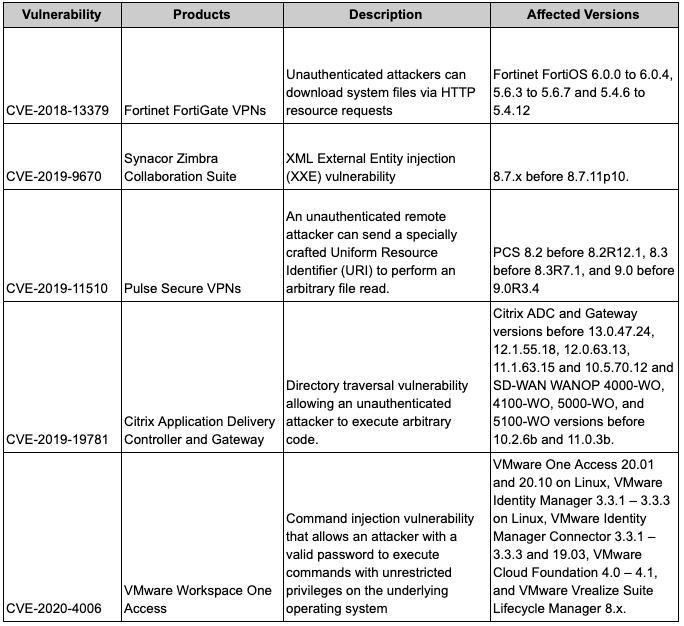
This is why many times MSPs come in and try to put all of their own equipment in your organization. A part of the reason is, if they are only having to track vulnerabilities to one specific brand of equipment, that’s a lot easier than having to track 24 different brands of equipment across a hundred different clients.
[12:18] Many times people take the approach “if it ain’t broke, don’t fix it.” The problem is there are all of these security issues with outdated software that patches will fix. And, as we often say, there is a difference between a vendor who focuses on IT and one that focuses on security. IT doesn’t always know all the software that your staff is using. Staff will download software onto their computer that IT knows nothing about and isn’t concerned with patching. Plus they tend to only follow threats to the applications they offer and not every other application installed on your computers. A MSP that is security focused is concerned with the security of all workstations, servers, printers, network devices, applications, etc connected to the network.Many times there is a misconception that if you buy a high end product, then it is secure and you don’t need to worry about vulnerabilities in the hardware or software and you are protected against cyber attacks. That is completely wrong. Everything in the cyber world changes rapidly. Your expensive, top of the line, “best device on the market” firewall might be secure today, but that is a point in time reference. That doesn’t mean it will be secure tomorrow. You still need to review the CVEs that are released and take action, if necessary.
Microsoft Patch Tuesday
[21:20] In addition to the NSA, CISA, FBI announcement, there also was the Microsoft Monthly Patch Tuesday release. In this batch of patches, Microsoft fixed 110 vulnerabilities – 19 classified as critical and another flaw classified as currently under attack.Microsoft Has Busy April Patch Tuesday with Zero-Days, Exchange Fixes
You should know how your IT team is responding to these kinds of alerts and patch releases. Do they load patches once a month and that’s all they tell you about their patch process? Or do they say that they evaluate cyber alerts and patches released for serious problems and handle those as soon as possible? Let’s take that a little further, do you receive updates from your IT team regarding the things they did last month or last quarter to protect your network against vulnerabilities and cyber threats? How much do you want to know? Sharing is caring and at least you will know that your IT team is paying attention and you have documentation to prove it.
[26:46] Remember the WannaCry and NotPetya ransomware attacks that spread around the world within 24 hours? The ones that were shutting down systems and where many companies lost a bunch of data and spent a boatload of money in recovering from the attacks? In both cases, the attack happened because of an unpatched Microsoft vulnerability.Cloud Infrastructure vs On Premises
[34:13] Many breaches these days are happening as a result of third party vendors, supply chain vendors. So, would it be best to move to the cloud vs having all your data stored locally on servers in your office? As with many things, it depends.For the vast majority of small businesses, the cloud likely is going to be a better solution because if data was stored locally you aren’t going to secure the servers properly. Unless you’re willing to make the investment and implement proper security, you are likely better off going to the cloud as long as you are vetting your vendors and making sure they are making the security investment on your behalf.
There is also the fact that companies aren’t willing to pay what it takes to manage, monitor and properly secure an on-site infrastructure. That’s part of what makes the “cloud” better because you are getting all of this infrastructure in place for pennies. If you decide to keep it in-house, are you willing to pay to have your specific infrastructure secured, managed and monitored properly? That’s where a cost benefit analysis comes in.
Understanding ongoing maintenance and security comes with a level of expense that you must incur in order to maintain an on premise infrastructure. So, if you are not willing to make that investment, then likely being “in the cloud” is the right choice. Just make sure you vet the vendors you are using.
IT likely doesn’t patch every system and software you and your staff use. Having a conversation with IT and understanding what they do patch and discuss who will be responsible for patching the things they don’t is key. There needs to be more communication between IT and decision makers. Don’t just assume IT is taking care of it. Confirm it, document it and make sure you receive reports on what IT is doing to protect and secure your network so you can prove it.
Remember to follow us and share us on your favorite social media site. Rate us on your podcasting apps, we need your help to keep spreading the word. As always, send in your questions and ideas!
HIPAA is not about compliance,
it’s about patient care.TM&
Special thanks to our sponsors Security First IT and Kardon.


